
Zimbra at Ikoula

Enjoy peace of mind with
secure business email.

Collaborate without compromise.
Email, calendars, contacts, files and collaboration tools together in a professional solution hosted in France.

Explore our plans  Why Zimbra?
MobileEmail & sync
ComputerWeb or Outlook
Tablet
📄
📁
Files & documentsSharing and collaboration
31
👤
Calendar & contactsSynced

Find the email solution that meets your needs.

Start with the essentials, then upgrade as your needs grow. All four plans can be combined under the same domain.

Zimbra Basic
Essential business email.
✉
15 GB
storage included
€0.99excl. VAT / month
per mailbox
€1.19 incl. VAT / month per mailbox
  • Email POP / IMAP / SMTP
  • Contacts and tasks
  • Mobile webmail
  • Antispam & antivirus
  • DKIM signing(1)
  • Daily email backup – 30-day retention


Number of mailboxes:
Zimbra Advanced
Organize your day-to-day business.
✉
25 GB
storage included
€1.49excl. VAT / month
per mailbox
€1.79 incl. VAT / month per mailbox
  • All Zimbra Basic features
  • Personal calendar
  • Contacts and tasks
  • Web and email client access
  • Antispam & antivirus


Number of mailboxes:
Zimbra Pro Plus
Collaboration, mobility and advanced features.
✉
100 GB
storage included
€3.49excl. VAT / month
per mailbox
€4.19 incl. VAT / month per mailbox
  • All Zimbra Pro features
  • ActiveSync mobile synchronization
  • Outlook / MAPI connector
  • Instant messaging
  • Two-factor authentication (2FA)
  • 100 GB of storage


Number of mailboxes:
No individual storage add-ons: as your needs grow, simply upgrade to the next plan.
(1) DKIM provides a way to validate the domain identity associated with an email message using cryptographic authentication.
Plans tailored to your users.
Management can use Pro Plus, collaborative teams can use Pro, and service mailboxes can use Basic, all under the same domain.
The Zimbra environment

Email, files and collaboration in one environment.

Access your messages, files and collaboration tools in a consistent environment, available on the web, on mobile devices and through your usual email clients.

Available features depend on the plan you choose. The range lets you equip each user according to their actual needs.
✉
Zimbra Webmail
Stay connected easily

Your email, wherever you work.

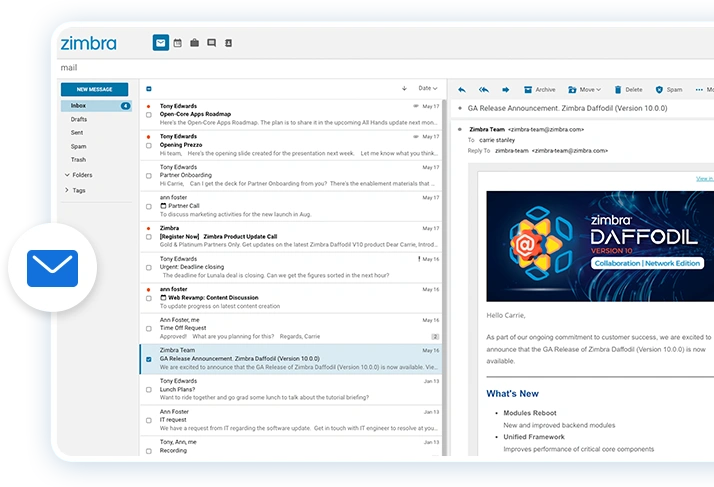
An intuitive webmail interface that brings together email, contacts, calendars and tasks, with powerful search and sharing features depending on your plan.

  • Email & search
  • Contacts & tasks
  • Calendars
  • Shared mailboxes
◉
Instant messaging
Communicate in real time

Chat without juggling multiple tools.

Communicate directly within Zimbra using instant messaging, team conversations and file sharing, depending on the features enabled.

  • Chat 1:1
  • Team conversations
  • History
  • File sharing
▣
Files & sharing
Keep your files in one place

Keep your documents close at hand.

Store, organize and share the files your teams need directly from the Zimbra collaboration environment.

  • File storage
  • Internal sharing
  • Centralized access
  • File management
✎
Collaborative documents
Create & collaborate

Create and co-edit documents in your browser.

Edit office documents and open formats, collaborate in real time and access version history.

  • Text documents
  • Spreadsheets
  • Presentations
  • Real-time co-editing
Why Zimbra?

Stay in control of your email and data.

Zimbra embraces open standards, compatibility with your existing tools and a modular approach. Ikoula adds hosting in France, a redundant platform and the personal support of a French hosting provider.

✉

All your work in one place

Email, contacts, calendars, tasks, file sharing and collaboration, depending on your chosen plan.

◎

Keep using your familiar tools

Web access, email clients, ActiveSync and Outlook depending on the plan: Zimbra integrates with your existing workflows rather than replacing them.

⌂

Your data stays in France

The Ikoula Zimbra platform is hosted in France, giving you clear visibility over where your data is stored.

⚿

Built-in security

Antispam, antivirus, DKIM and backups. Advanced features such as 2FA are available with eligible plans.

↔

A truly flexible range of plans

Mix plans under the same domain and only pay for advanced features for the users who need them.

↗

Scale without starting over

Need more storage or features? Simply upgrade to the next plan.

20+ yearsof Zimbra experience
200 M+mailboxes deployed
6 000+organizations using Zimbra
127countries covered

Ready for more worry-free business email?

Our experts will help you find the best plan for your organization.

Technical specifications

A wide range of features to customize your collaboration suite

Zimbra BasicZimbra AdvancedZimbra ProZimbra Pro plus

Core features

Email
Basic search
Contact list
Custom distribution lists (internal and external)
Global Address List (GAL)
Tasks
POP / IMAP / SMTP email
CardDAV, CalDAV and iCal files (for iPhone & smartphones)
Mobile web client
Local calendar
Shared calendar
Conversation view
Search within attachments
Search with advanced filters
Document preview
Scheduling (groups and resources)
MS Exchange interoperability (Free/Busy)
Files & sharing
Collaborative documents
Outlook for Mac (Exchange Web Services)
ActiveSync mobile synchronization (iOS, Android, Windows)
Instant messaging / chat and file sharing, subject to technical validation of video and screen-sharing features

Questions & Answers About our Zimbra plans

Collaborate without compromise. Email, calendars, contacts, files and collaboration tools together in a professional solution hosted in France.

  • What is Zimbra?

    Zimbra is a collaboration suite designed specifically for businesses, including email, internal chat, document sharing and office productivity software. Easy to use, Zimbra lets you synchronize all your accounts with your mobile devices and access all your documents through webmail.

  • Why choose Zimbra?

    Zimbra business email and collaboration suite brings together the calendars, file sharing and email tools that today’s businesses rely on. As an open-source solution, Zimbra offers a broad range of features accessible from the web, leading email clients and compatible mobile devices. It can be customized to suit each employee’s preferences and working habits, making Zimbra suitable for every type of business and budget.

    Zimbra runs on IKOULA’s reliable infrastructure and is hosted in France, so businesses benefit from data protection under European and French law.

  • How do I use Zimbra?

    To use Zimbra, you first need to create a Zimbra email account. Go to your IKOULA customer account or sign up at https://commande.ikoula.com. Select “Manage Domains” to add the domain for your future email address. Once the domain has been created using “Add Domain”, click “New Account” and follow the steps to create your mailbox.

    You can then customize your Zimbra account to suit your needs and goals, set up your calendar, import your business contacts, or create shared folders and documents.

  • How do I block an email address in Zimbra?

    To block an email address from your Zimbra account, go to “Settings”, then click “Blocked and Allowed Senders”. Enter the email address you want to block.

  • How do I archive emails in Zimbra?

    Your Zimbra mailbox may have a storage limit, which means you may need to archive older emails to remain within your quota and free up space. You can delete unnecessary messages or save and archive emails offline in a local folder on your computer. To do this, create a subfolder and drag the emails you want to archive into it. Then right-click the folder and select “Export” to save the emails locally on your computer. These archived messages will no longer be accessible from Zimbra servers, only from your local computer.

  • Do all Zimbra plans include backups?

    Yes. All Zimbra plans include daily mailbox backups with 30-day retention.

    Restoration from these backups is available on request and is subject to an additional fee.

  • How do I log in to Zimbra?

    You can sign in to your Zimbra email and collaboration suite in two ways. The first is through the Zimbra interface, where you enter your business email address and current password. The second is through webmail, which is accessible from any web browser. In either case, enter your business email address and password to access your inbox and all the documents and files stored in the collaboration suite.

  • How do I create a Zimbra account?

    To create a new Zimbra account, for example a new mailbox for one of your employees, go to your IKOULA customer account or sign up at https://commande.ikoula.com . Before proceeding, make sure you have added a domain to your customer account by selecting “Manage Domains” from the main menu.

    Select the domain for which you want to create a Zimbra account, then click “New Account” and complete the required fields. Your new Zimbra account will appear in the list of available accounts and can be edited or deleted using the controls at the end of each row.

  • I forgot or lost my Zimbra password. What should I do?

    If you have forgotten or lost your password, you cannot recover it yourself. Contact technical support, preferably by email, so they can set up a new one. Once you receive your new password, you will be asked to change it directly in Zimbra before signing in again.

Can’t find the answer you need? Contact our support team