Author Name: Manon — Publish on: Tuesday, November 3, 2026 - 11:42
Building and scaling your web environment independently with Synology
Alex uses a Synology hosted by Ikoula for his web project. Initially used for file storage, this environment now hosts containers, a PostgreSQL database and automations using n8n. His experience shows how to get started easily, then become more independent as needs arise.

Initially, Alex wanted to quickly set up a functional environment for his web project, whilst retaining the flexibility to scale it up. At the time, he had no particular expertise in system administration.
At the start of the project, terms such as containers, databases, automation and development environments were mostly unfamiliar to me.
Today, he manages the operation and development of his services on his Synology himself.
Getting started with ease
Hosting, storage, databases, certificates, backups: when launching a web project, infrastructure-related questions can quickly pile up.
Alex wanted to avoid a complex architecture whose components he wouldn’t fully understand. He needed an accessible starting point, with the option to add services later on.
His Synology was initially used to store and organise the project’s files, in a work environment accessible remotely.
DiskStation Manager (DSM), Synology’s operating system, allowed him to manage these tasks via a graphical interface accessible through a web browser. Storage, applications and system settings are all centralized there.
With Synology DSM, the approach is much more user-friendly than a traditional server.
The Package Centre also contributes to this approach: it allows various services and applications to be installed from within DSM, functioning much like an app store.
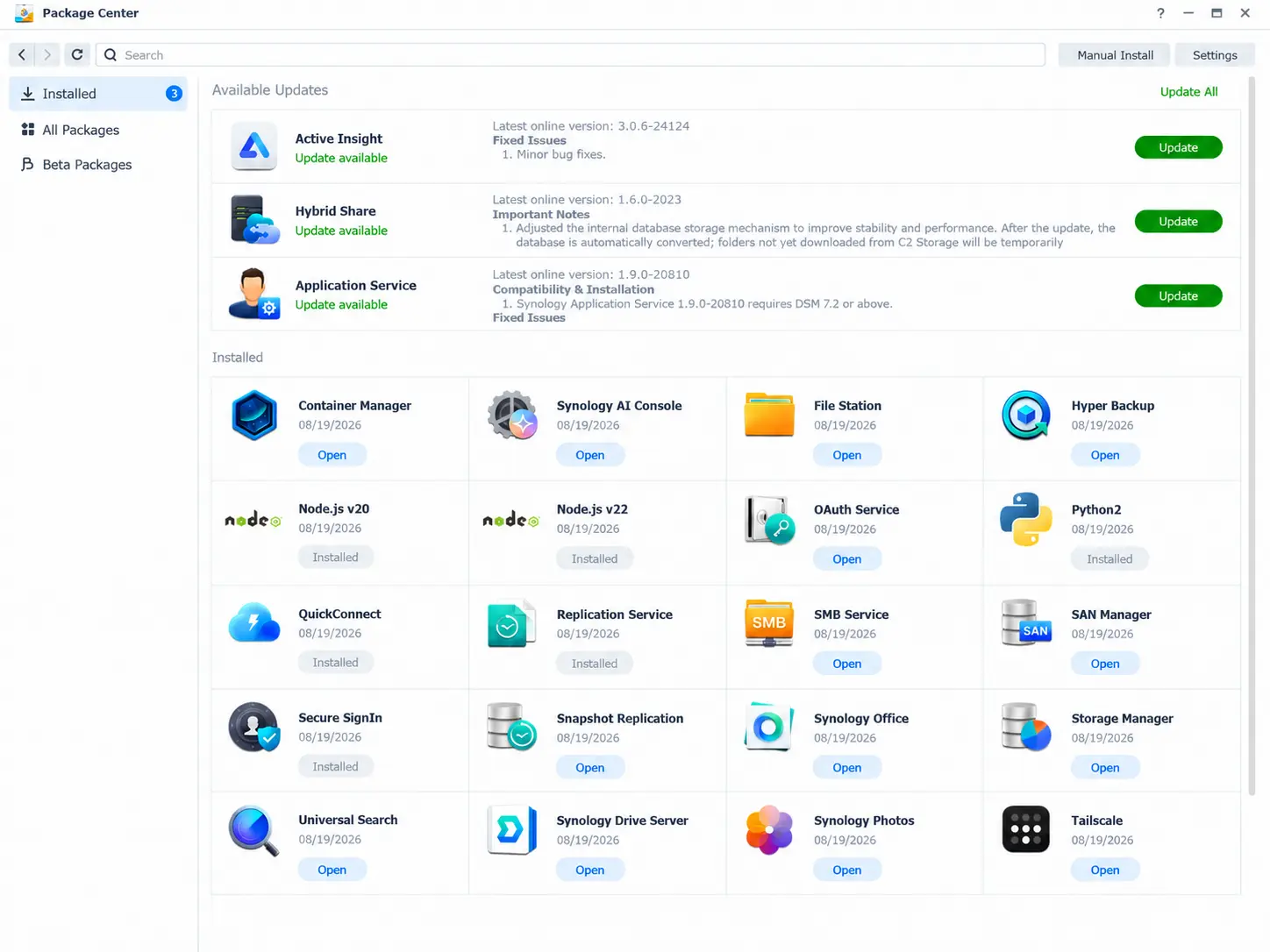
Synology Package Centre interface
Alex can therefore set up the features he needs for his project, then expand his environment as and when required.
Scaling your environment as your project grows
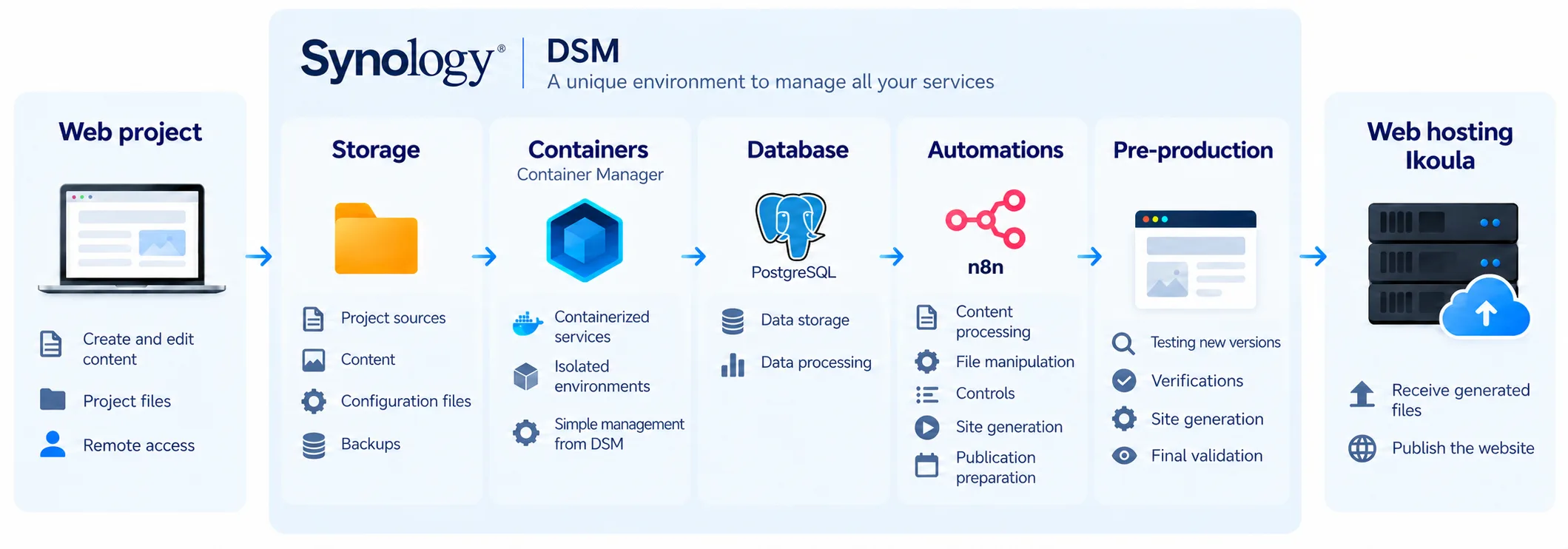
As the project progressed, the role of the Synology expanded. Initially used to centralise files and the working environment, it gradually became a pre-production environment: Alex uses it to prepare and test changes to his project before they go live.
To run several independent services, he opted for containers. Container Manager allows him to deploy and manage his applications from DSM. He then added a PostgreSQL database to address new application requirements.
Later, when certain tasks became repetitive, Alex installed n8n to automate a variety of operations: content processing, file management, checks, website generation or even preparing his site for publication to his web hosting provider.
I was able to discover the services I needed, step by step, without having to rebuild the entire infrastructure every time I had a new idea.
In Alex’s case, containers, PostgreSQL and n8n weren’t part of the original plan. Each new technology was adopted to meet a specific need, as and when it became useful.
Simplifying day-to-day administration
Once several services are up and running, the challenge is no longer simply about being able to set them up: it is also about being able to manage them easily.
With DSM, Alex has access to a large part of his environment within a single interface. This centralisation makes it easier to monitor his services and reduces the number of administration tools required.
On a day-to-day basis, operation is particularly straightforward: the services are centralized, accessible from a single interface and easy to scale.
This ease of use does not eliminate the technical requirements. Administering a database, using containers or exposing a service on the internet requires an understanding of its configuration and the application of associated best practices.
Securing the environment is therefore part of this skill development: access management, exposed service monitoring, log review and connection attempt analysis are now among the tasks Alex can manage from his environment.
Gaining greater independence over time
Over the course of the project, Alex’s Synology has become much more than just a storage space: it now brings together the services he uses to prepare, test and develop his web project. This environment has been built up gradually, based on the needs he has encountered and the skills he has acquired.
Alex sums up the result as follows: “A single Synology now enables me to run and develop my project without having to manage a complex and costly infrastructure.”
Alex’s journey illustrates a gradual approach to managing the infrastructure of a web project. Rather than mastering all the tools that might be needed right from the start, he was able to set up an initial environment and then expand it as his project required. DSM served as the entry point for managing and developing these various services within a single environment.
The initial focus on simplicity did not prevent the project from evolving into something more technically sophisticated. Above all, it allowed Alex to get started without having to master everything immediately, and then to develop his use and skills in line with the progress of his project.